A private journal for iPhone and iPad

Your private journal, but you’re not alone.

Meet Mero, the gentle companion inside Merorme. Write, talk or add a photo — Mero remembers what you wrote and gives it back when you ask.

  • No account
  • No server
  • No analytics

A name you mentioned once. A plan for Saturday. The bakery a friend swore by. Merorme keeps them in your own words, on your own device — and Mero helps you find your way back to them.

Meet Mero

A small light that keeps you company.

Mero is the journal’s companion. It waves when you open the app, listens while you talk, thinks while it reads back through what you wrote — and rests when you’re away. It never guesses your mood: a mood is always the one you set.

Idle — at rest

Soft eyes with a slow blink, a small smile, tendrils swaying at their own rhythms. The light on its forehead breathes with it.

Each state differs in colour, shape and motion, so Mero still reads clearly with Reduce Motion on.

Remember

It remembers what you wrote.

People you mention, plans you make, places you go. Ask Mero about your own life and it answers from your entries — and tells you when you wrote it.

TodayDone

Thursday, 15 October

Calm

When is Ada’s recital again?18:02

Saturday at four, at the community hall. You wrote it down on the 2nd, right after her rehearsal.18:02

And the bakery Sam told me about?18:03

The little one by the pier — Sam said to go early, before the ferry crowd. That was in your entry from the 9th.18:03

An example conversation in the journal, with invented names: asked about a niece’s recital and a friend’s bakery tip, Mero answers from earlier entries and says when they were written.
  1. People you mention

    Ada, Sam, Grandma June: the people in your entries, and who they are to you, as you wrote it.

    Ada’s rehearsal ran late, but she nailed the solo. Recital is Saturday at 4, at the community hall.

    • person
    • plan
    • place
  2. Plans you make

    Write that you’ll call someone, see someone or go somewhere, and the journal keeps that sentence — then asks you how it went. Follow-ups stay on your device, and you can turn them off.

    “Call Grandma June on Sunday.”

    You were going to call Grandma June. How did it go?

  3. Ask about your own life

    Ask in plain words. Mero looks back through your entries and answers with what you wrote — and when. Replies can be read aloud, too.

    You ask: When did I last see Rafi?

    Mero answers: Sunday the 11th, at the harbour steps — you wrote that he’d brought his old camera.

Every day, at a glance

  • The moods you set

    A calendar of your days, coloured by the mood you chose for each — not one worked out from your words.

  • Your places

    Your photographs on a map, where their own files say they were taken.

  • Reflect

    Steps, sleep and daylight from the Health app, if you allow it — read fresh each time, never stored.

  • Your calendar, if you want

    Off until you turn it on. Mero can read a day’s events to answer you — it never adds, changes or deletes one.

Photos

Faces and places, remembered your way.

Add a photograph to an entry and Mero takes it in. When the same person appears in more than one of your photos, the journal asks who they are and remembers the name you give.

  • It never names a stranger

    Face grouping is Apple’s, on your device. Merorme receives no image of a face — only a label — and never puts a name on someone you haven’t named.

  • Where it was taken, as a place

    If a photo records where it was taken, Apple’s map can tell the journal the place’s name. It’s a switch you can turn off — and a name you give is always the one it uses.

Voice

Say it out loud. Hear it back.

Some days, talking is easier than typing. Speak to the journal and your words are written down on your device; let Mero read its reply aloud in one of your iPhone’s voices — or in your own Personal Voice, if you allow it.

The sound of your voice is never kept or sent: it becomes words on your device, and replies are spoken there.

A visual demonstration with invented words. No sound plays.

Play · the Bored tab

Bored? Four small games for a pause.

Nines, Doubles, Letters and Tempo have a tab of their own. Each has a round of the day — kept in step on your iPhone and iPad through your own iCloud — and unlimited rounds whenever you want more.

  • Nines

    Number place in four sizes, each puzzle with one answer.

    4×4 · 6×6 · 9×9 · 16×16 — Gentle or Steady

  • Doubles

    Sliding tiles, 3×3 to 6×6. Two equal tiles that meet become one worth both; the goal is a 2048 tile, or 256 on 3×3.

    The day’s round, or unlimited — with one undo

  • Letters

    A hidden five-letter word, found in six tries.

    Today’s word, or unlimited

  • Tempo

    Circles on the beat, each tapped as its ring closes.

    A Gentle piece or a Steady one — its music made on the phone

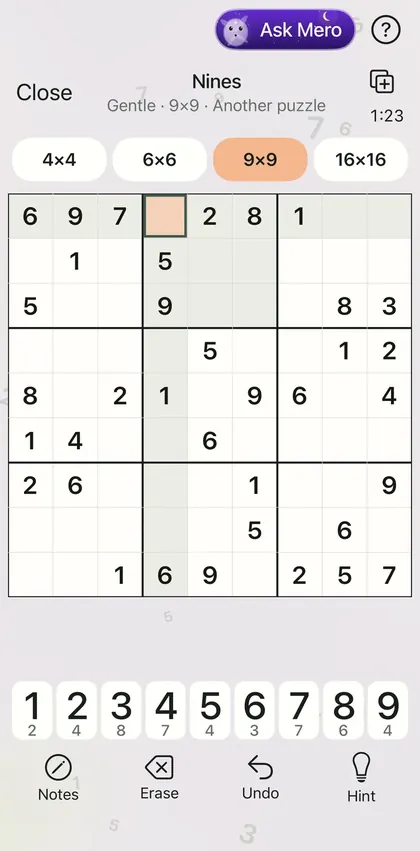
Nines in the app, a 9×9 Gentle puzzle in progress, with the violet Ask Mero button in the bar at the top.

Stuck? Ask Mero.

Mero sits in every game’s bar. It reads the round as it stands and answers by the game’s own rules — worked out, never guessed.

Nines
the next step, and why
Doubles
the best swipe, weighed two moves ahead
Letters
the words that still fit, and the best try
Tempo
how your last run was counted

Asking never costs a point. A round won clean, without asking Mero, counts as a pure win.

Game Center, if you play there

Signed in to Game Center, a won round’s result goes to its leaderboard, and your rounds earn achievements on your profile.

  • Ninesyour time
  • Doublesyour score
  • Lettersyour run of words found
  • Tempoyour score

13achievements — and each one is one of Mero’s cards.

Nothing you write goes with them. Sign out of Game Center and nothing more goes.

Mero’s cards

Win rounds. Collect Mero.

Thirteen cards, each won by your rounds. Signed in to Game Center, every card you win is an achievement there too. And then the cards go on — in six kinds, each card asking more than the one before.

  • Wins
  • Pure wins
  • In a row
  • Best round
  • Points
  • Days

A day missed takes nothing away.

“Clean grid”, a Rare card worth 50 points: win a round of Nines with no hint and no wrong number. Brushed silver.
“Five grids in a row”, a Holo Rare card: win five rounds of Nines in a row. A rainbow swirl.
“First grid”, a Common card worth 25 points: win your first round of Nines. The journal card’s own foil.

Nine rarities, nine materials

The cards that go on climb through them tier by tier — up to a mythic night sky.

  • Commona film’s bright bands on the diagonal

  • Rarebrushed silver

  • Holo Rarea rainbow swirl

  • Ultra Rareglass broken into shards

  • Gold Rarehammered gold

  • Diamond Rarea diamond’s facets

  • Fire Rarefire rising from the card’s foot

  • Ice Rarefrost crystals of ice

  • Mythic Rarea night sky with an aurora

Privacy

Nothing on our side to read.

Merorme has no server, no analytics and no account — nothing to sign up for, and no password. Your journal is stored on your iPhone or iPad — and in your own iCloud, if you use it. We never receive a copy, so there is nothing on our side to read, to sell, to hand over or to lose.

Stored on your device

  • Everything you write
  • Your photographs
  • What you say to it
  • The moods you set
  • What it remembers
  • The replies

To us: nothing at all.

What can leave — never to us

  1. Where a photo was taken

    to Apple’s map, for the place’s name · a switch you can turn off

  2. The area on screen

    to Apple’s map, while you look at the map of your places

  3. Where you are

    to Apple’s weather service, for the weather under the date · only if you allow location

  4. An entry you haven’t sent yet

    to your own other devices, through Apple’s Handoff

  5. What you write, for a reply

    to Apple’s Private Cloud Compute · only if you turn on Apple’s cloud model

  6. A won round’s result

    to Game Center · only while you’re signed in

  • Replies on your device

    Mero’s replies are written by Apple’s model on your device. They’re off until you turn them on, and they still work in aeroplane mode.

  • Apple’s cloud model, only if you choose

    Turn on Apple’s larger model and an entry’s words go to Apple’s Private Cloud Compute for that request — never to us. Apple states the data is used only to answer, and kept only until the answer is returned.

  • Health, never stored

    If you allow it, figures from the Health app are read fresh each time and shown to you — never stored, synced, exported, or given to the model.

  • Yours to keep, yours to delete

    Export everything at any time, in a format you can read without the app. Delete the app and the journal leaves that device — there is no copy with us to delete.

Apple Intelligence and Private Cloud Compute are Apple’s services; what they support depends on your device, language and region, under Apple’s published requirements. For your iCloud backup, we recommend turning on Advanced Data Protection. Read the full privacy policy · Apple’s privacy information

Coming to the App Store.

Merorme, with Mero, for iPhone and iPad.

Coming to theApp Store

Merorme is for people 16 and over.